.png)
 2 months ago
🎙️ Daily Podcast (FR) : NViNiO•Podcast™
ADs | ✨ Enhance your Social Media content with NViNiO•AI™ for FREE
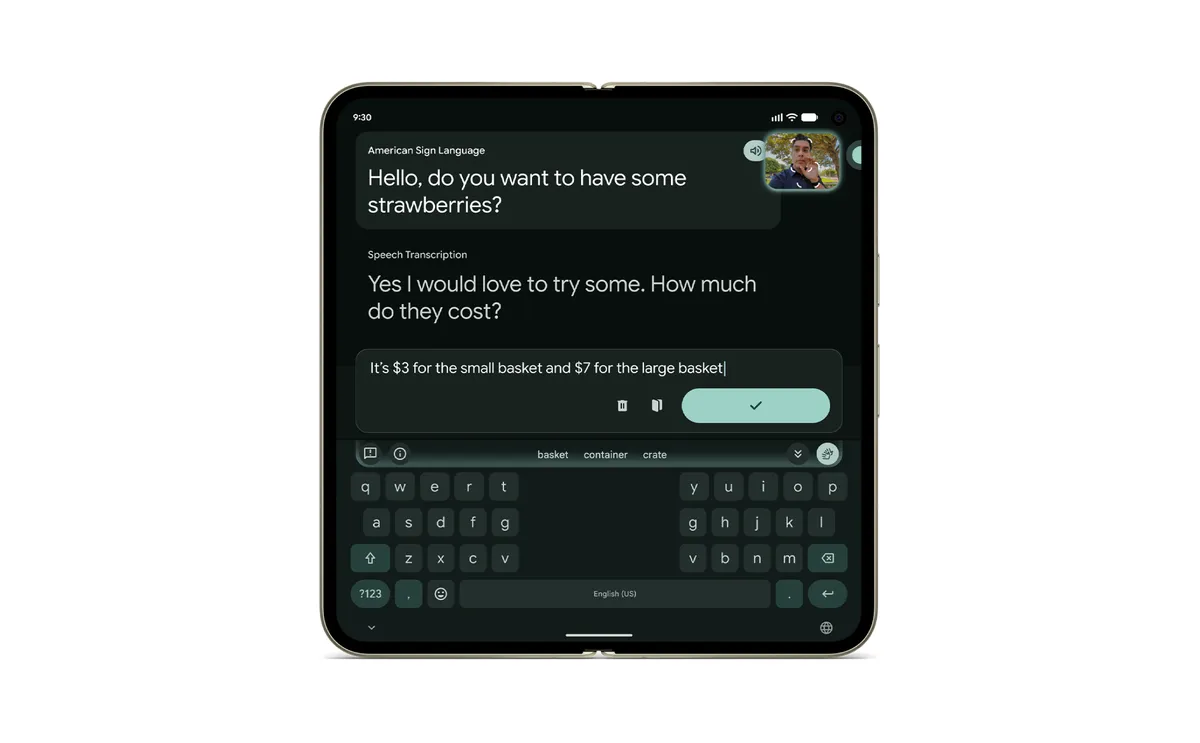
The brand new Pixel 11 series will bring a new sign-to-text translation feature to people who communicate using American Sign Language (ASL). Developed in partnership with the Deaf community, the new feature is powered by a multilingual sign language-to-text (SL2T) translation model. It analyzes hand shapes, facial expressions, and body movements to translate ASL into written English sentences in real time.
The feature, which supports both one-handed and two-handed signing, lets signers use their native language to express themselves when using Live Transcribe or across their device with Gboard.
To use this feature on a Pixel 11 device, add sign-to-text to your Gboard toolbar, and sign in ASL to the front camera. The translations will appear on the outer display.
The Pixel 11 series is available on shelves now. Visit the Google Store for more information on availability and product updates.









 English (United States) ·
  French (France) ·