.png)
.png) 1 year ago
1 year ago
🎙️ Daily Podcast (FR) : NViNiO•Podcast™
ADs | ✨ Enhance your Social Media content with NViNiO•AI™ for FREE

With the release of NVIDIA AgentIQ—an open-source library for connecting and optimizing teams of AI agents—developers, professionals, and researchers can create their own agentic AI applications. This tutorial shows you how to develop apps in AgentIQ through an example of AI code generation. We’ll build a test-driven coding agent using LangGraph and reasoning models to scale test-time computation.
Scaling laws are driving smarter AI systems in pre-training, post-training, and inference. The large-scale pretraining of large language models (LLMs) delivers impressive results but is challenging to scale further. Autonomous AI agents and test-time compute methods, such as those used by Deepseek-R1, are providing notable improvements by scaling post-training and inference compute. This becomes imperative when building agentic workflows for complex tasks such as logic, math, or coding.
These novel scaling methods are simpler to adopt with AgentIQ, as organizations can better design, test, deploy, and optimize their AI agent applications. Let’s dive into how you can improve AI code generation workflows within AgentIQ.
Why build coding agents with AgentIQ
LLMs excel at coding tasks but are limited to a chat interface, lacking autonomy and integration with the real world. In contrast, AI agents, powered by these LLMs, are designed to accomplish real-world goals. They often interact with their environment using tools, memory, and planning to execute tasks like file editing, code execution, or information search.
AI agent design considerations
AI agents are one example of scaling inference-time computation for improving AI performance. To build an agent or multi-agent system, you must balance flexibility against structure.
A flexible agent might be given a shell, a code editor, and a web browser, and be tasked with minimal instruction. In contrast, a structured agent might consist of predefined steps, such as localizing a failed test case within a larger codebase and then executing code changes until the error is resolved. A popular middle ground is flow engineering, where states and transitions are defined, and an agent or tool executes within each state.
Reasoning models and search methods are another example where inference-time computation matters. Reasoning models such as DeepSeek-r1 or OpenAI o1 spend extra time exploring various reasoning paths and solutions within a single chain of thought before providing a final output. Search methods, such as beam search, also explore various branches, leveraging a scoring function such as a verifiable outcome or an approximation.
Ease of AI agent development with AgentIQ
Evaluation, deployment, and optimization are a few common challenges developers can resolve with AgentIQ. The following table summarizes some of the features and benefits of AgentIQ.
| Feature | Benefit |
| Inclusive of agent framework ecosystem | Continue building with your favorite tools like LangGraph and CrewAI. |
| Common specification | Enables reusability and compatibility across projects, including many examples within AgentIQ. Projects can be shared through the AgentIQ registry system. |
| Evaluation harness | Rapid development and iteration on workflows. Define a set of expected outputs and easily test different models, tools, and workflows by updating the configuration file. |
| Built-in deployment options | Easily launch microservices with aiq serve or leverage the open-source chatbot-style user interface. |
| Optimization features | Identify bottlenecks with the workflow profiler and leverage features like parallel tool calling and integration with NVIDIA Dynamo for best performance. |
| Observability | Monitor and debug with tight integration with Phoenix, OpenTelemetry Collector, and custom providers. |
Please refer to the documentation or GitHub for a detailed list of features.
Tutorial prerequisites
You’ll need the following setup:
NVIDIA GPUs to run reasoning NIM microservices NVIDIA AgentIQ Toolkit LangGraph frameworkHow to build an AI code generation agent in NVIDIA AgentIQ
You’ll be guided through integrating AI agents and reasoning models to create an AI code-generation agent in AgentIQ. We build the core agent using LangGraph, integrate a sandbox code execution tool for safety and control, and enhance error correction with DeepSeek-r1. Lastly, we show how the agent can be integrated into a larger system using a supervisor agent.
Set up the project scaffold
First, clone the NVIDIA AgentIQ GitHub repository. Follow the instructions in the README to install the AgentIQ library.
Now create a new project template using the AIQ scaffold command. The scaffold will include a default workflow and configuration file.
aiq workflow create code_gen_exampleNVIDIA AgentIQ unifies the concepts of agentic workflows and callable tools under a single class, the function. We can implement the code generation agent as a function, and use it as a callable tool within a supervisor agent, such as a ReACT agent. Other agents, such as a research agent, error localization agent, or test generation agent, can be managed by the supervisor and launched asynchronously for handling complex tasks.
The input to the code generation agent will be a problem statement, code to fix, and unit tests. The agent follows a simple process:
Given the problem statement (e.g. GitHub issue), code to fix, and unit tests, the agent uses a code LLM for code generation to create a git patch that resolves the issue. The updated code runs against the unit tests in a safe code execution sandbox. If the test fails, a reasoning model will suggest changes based on the output. Steps 1-3 repeat until either the generated code passes the desired unit tests, or the maximum number of iterations is exceeded.Update the configuration file
The configuration file in AgentIQ defines the entire workflow. By updating the configuration file, such as adding tools (functions), swapping LLMs, or changing other components, agentic workflows can be rapidly iterated on with evaluations through the aiq eval cli command.
The scaffold command creates a default config file. Update three sections: functions, llms, and workflow. The functions section contains tools accessible to agents, the llms section defines which models are available to agents and tools, and the workflow is the main entry point. Here, specify the workflow type as react_agent, which will use the default ReACT agent inside the AgentIQ toolkit.
In this example, all three LLMs are served with NVIDIA NIM which can be accessed through the NVIDIA API catalog or hosted locally. OpenAI and other LLM providers are also supported. Visit the documentation to learn more.
Implement the code generation function
Create the code generation function referenced in the configuration file. In the project scaffold, open the register.py file and add:
Within this function, we’ll define helper functions and a primary runnable function, _code_gen_tool, to run when the tool is called. Implement a LangGraph workflow with four steps:
1. The user (or another agent) inputs a problem statement (e.g. GitHub issue), code to fix, and unit tests that should pass or be fixed. The agent is prompted to create a git patch that resolves the issue, using the configured coding LLM.
2. The updated code runs in a code execution tool to evaluate the results.
3. If the test fails, the reasoning model is prompted to suggest changes based on the problem statement, code, and test output.
4. Steps 1-3 repeat until either the generated code passes the desired unit tests, or the maximum number of iterations is exceeded.
Each node in the LangGraph agent is defined in a Python function, which can be an autonomous agent, a tool call, or anything else. The generate_code node uses the Qwen NIM to generate code, the run_unit_test node runs the tests against the updated code in a sandbox environment, and the debug node uses Deepseek-R1 for advanced reasoning about failures.
AgentIQ uses yield to register a function as callable from any other function. Providing a detailed and accurate description for functions is critical to developing agents that interact with each other effectively.
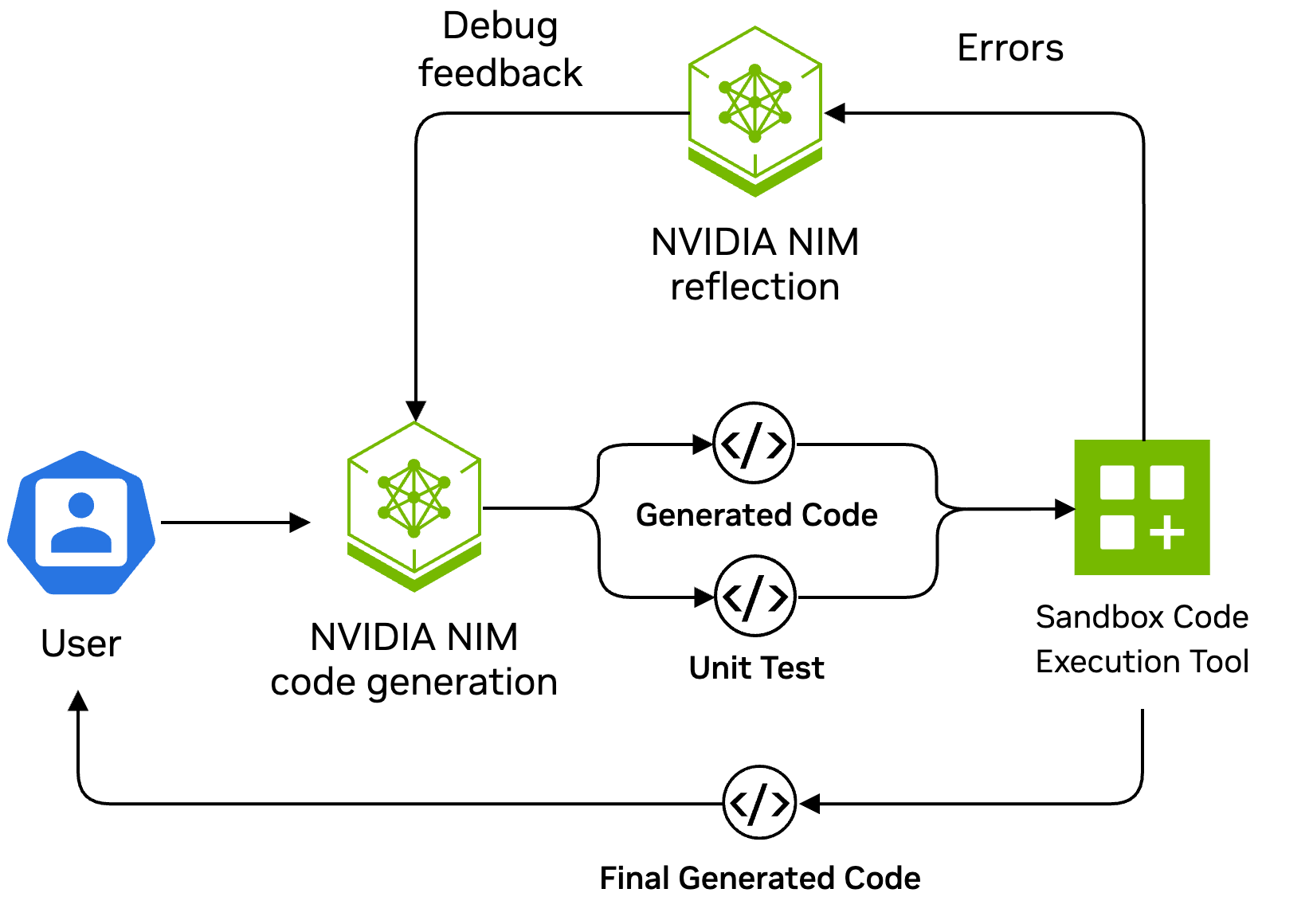 Figure 1. A code modification agent diagram
In this tutorial, we omitted some implementation details of the LangGraph pipeline. The AgentIQ examples directory contains various complete examples to get started.
Run the example workflow
AgentIQ provides a CLI with various features including running a workflow, launching a server, and performing evaluations.
Run the workflow directly:
The logs will display in the console, and the agent can be easily integrated with the AgentIQ user interface.
The following is an example of the output.
Adding functions in configuration file to execute varied tasks
Adding capabilities to the supervisor agent, such as web search or calculator use, is as simple as adding the functions in the configuration file. AgentIQ provides many useful tools to get started. See a full list of the tools available to agents by default within the AgentIQ tools folder.
Conclusion
Code generation problems are excellent candidates for test-time compute scaling because it’s possible to identify when a solution is correct. For example, a test-driven development agent can iterate on proposed solutions, with the number of iterations limited only by a compute budget. Reasoning LLMs such as DeepSeek’s R1 model provide reflections that can accurately guide a code generation model through a debugging process. Agentic tool use, memory, and planning can be integrated to improve the system.
The NVIDIA AgentIQ library simplifies the development of agentic systems, providing reusable components and a simple toolkit compatible with the entire ecosystem and optimized for the best performance. By orchestrating different models, frameworks, and tools under a comprehensive and optimized toolkit, we’re transforming the future of work by solving complex, real-world tasks.
Watch this video to learn how to use the AgentIQ profiler. Sign up for the AgentIQ Hackathon and learn to build hands-on skills using the open-source toolkit that will help you advance your agentic systems.






 English (United States) ·
  French (France) ·